scEU-seq: cell cycle kinetic analysis
This tutorial demonstrates single-cell kinetic analysis of cell cycle dynamics using dynamo with scEU-seq technology. We analyze the cell cycle dataset from Battich, et al (2020), which represents the first tutorial in our scEU-seq series. For organoid dataset analysis, please refer to the organoid tutorial.
Recently Battich and colleagues reported scEU-seq as a method to sequence mRNA labeled with 5-ethynyl-uridine (EU) in single cells. By developing a very creative labeling strategy (personally this is my favorite labeling strategy from all available labeling based scRNA-seq papers!) they are able to estimate RNA transcription and degradation rates in single cell across time.
They applied scEU-seq and the labeling strategy to study the transcription and degradation rates for both the cell cycle and differentiation processes. Similar to what has been discovered in bulk studies, they find the transcription rates are highly dynamic while the degradation rate tend to be more stable across different time points. Furthermore, by quantifying the correlation between the transcription rate and degradation rates across time, they reveal major regulatory strategies.
For both the cell cycle and the organoid systems, the authors use kinetics and a mixture of pulse and chase experiment to label the cells. I had a lot of fun to analyze this complicated dataset. But for the sake of simplicity, here I am going to only use the fraction of kinetics experiment for demonstrating how dynamo can be used to estimate labeling based RNA velocity and to reconstruct vector field function.
import warnings
warnings.filterwarnings('ignore')
warnings.filterwarnings("ignore", message="numpy.dtype size changed")
import dynamo as dyn
dyn.configuration.set_figure_params('dynamo', background='white')
dyn.pl.style(font_path='Arial')
dyn.get_all_dependencies_version()
%load_ext autoreload
%autoreload 2
Using already downloaded Arial font from: /tmp/dynamo_arial.ttf
Registered custom font as: Arial
███ ████████
█████ █████ █████ █████ ███ █████
██████ ██████ ██████ ████████ ████
___ ████ ███
| \ _ _ _ _ __ _ _ __ ___ ███
| |) | || | ' \/ _` | ' \/ _ \█████ ███
|___/ \_, |_||_\__,_|_|_|_\___/█████ ████
|__/ ███ █████
Tutorial: https://dynamo-release.readthedocs.io/
█████
| package | umap-learn | typing-extensions | tqdm | statsmodels | setuptools | session-info | seaborn | scipy | requests | pynndescent | pre-commit | pandas | openpyxl | numdifftools | numba | networkx | mudata | matplotlib | loompy | leidenalg | igraph | dynamo-release | colorcet | anndata |
|---|---|---|---|---|---|---|---|---|---|---|---|---|---|---|---|---|---|---|---|---|---|---|---|---|
| version | 0.5.7 | 4.13.2 | 4.67.1 | 0.14.4 | 79.0.0 | 1.0.1 | 0.13.2 | 1.11.4 | 2.32.3 | 0.5.13 | 4.2.0 | 2.2.3 | 3.1.5 | 0.9.41 | 0.60.0 | 3.4.2 | 0.3.1 | 3.10.3 | 3.0.8 | 0.10.2 | 0.11.8 | 1.4.2rc1 | 3.1.0 | 0.11.4 |
Load data
Let us first load the scEU-seq RPE1 dataset using dynamo.sample_data.scEU_seq_rpe1() and examine the number of cells collected at each labeling time point for both pulse and chase experiments.
rpe1 = dyn.sample_data.scEU_seq_rpe1()
|-----> Downloading scEU_seq data
|-----> Downloading data to ./data/rpe1.h5ad
|-----> in progress: 99.0354%|-----> [download] completed [73.3982s]
dyn.convert2float(rpe1, ['Cell_cycle_possition', 'Cell_cycle_relativePos'])
rpe1
AnnData object with n_obs × n_vars = 5422 × 11848
obs: 'Plate_Id', 'Condition_Id', 'Well_Id', 'RFP_log10_corrected', 'GFP_log10_corrected', 'Cell_cycle_possition', 'Cell_cycle_relativePos', 'exp_type', 'time'
var: 'Gene_Id'
layers: 'sl', 'su', 'ul', 'uu'
rpe1.obs.exp_type.value_counts()
exp_type
Pulse 3058
Chase 2364
Name: count, dtype: int64
rpe1[rpe1.obs.exp_type=='Chase', :].obs.time.value_counts()
time
120 541
0 460
60 436
240 391
360 334
dmso 202
Name: count, dtype: int64
rpe1[rpe1.obs.exp_type=='Pulse', :].obs.time.value_counts()
time
30 574
45 564
15 442
120 408
60 405
180 400
dmso 265
Name: count, dtype: int64
Subset the kinetics experiment data
For the sake of simplicity, I am going to focus on the kinetics experiment dataset analysis using dynamo.
rpe1_kinetics = rpe1[rpe1.obs.exp_type=='Pulse', :]
rpe1_kinetics.obs['time'] = rpe1_kinetics.obs['time'].astype(str)
rpe1_kinetics.obs.loc[rpe1_kinetics.obs['time'] == 'dmso', 'time'] = -1
rpe1_kinetics.obs['time'] = rpe1_kinetics.obs['time'].astype(float)
rpe1_kinetics = rpe1_kinetics[rpe1_kinetics.obs.time != -1, :]
rpe1_kinetics.layers['new'], rpe1_kinetics.layers['total'] = rpe1_kinetics.layers['ul'] + rpe1_kinetics.layers['sl'], rpe1_kinetics.layers['su'] + rpe1_kinetics.layers['sl'] + rpe1_kinetics.layers['uu'] + rpe1_kinetics.layers['ul']
del rpe1_kinetics.layers['uu'], rpe1_kinetics.layers['ul'], rpe1_kinetics.layers['su'], rpe1_kinetics.layers['sl']
rpe1_kinetics
AnnData object with n_obs × n_vars = 2793 × 11848
obs: 'Plate_Id', 'Condition_Id', 'Well_Id', 'RFP_log10_corrected', 'GFP_log10_corrected', 'Cell_cycle_possition', 'Cell_cycle_relativePos', 'exp_type', 'time'
var: 'Gene_Id'
layers: 'new', 'total'
Perform a typical dynamo analysis
A typical analysis in dynamo includes:
the preprocessing procedure using
dynamo.pp.recipe_monocle();kinetic estimation and velocity calculation with
dynamo.tl.dynamics();dimension reduction via
dynamo.tl.reduceDimension();high dimension velocity projection using
dynamo.tl.cell_velocities();vector field reconstruction with
dynamo.vf.VectorField
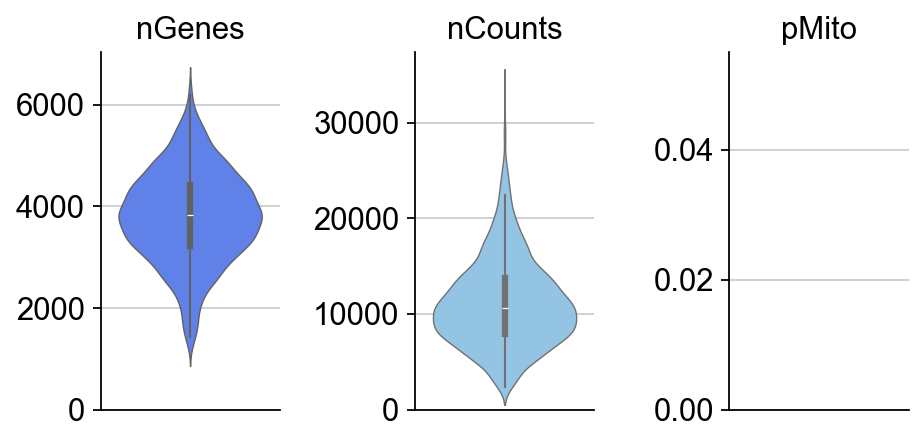
Note that in the preprocess stages, we calculate some basic statistics, the number of genes, total UMI counts and percentage of mitochondrial UMIs in each cell so we can visualize them via dynamo.pl.basic_stats(). Moreover, if the adata.var_name is not official gene names but ensemble gene ids, dynamo will try to automatically convert those gene ids into more readable official gene names.
dyn.pl.basic_stats(rpe1_kinetics,figsize=(2,3))
rpe1_genes = ['UNG', 'PCNA', 'PLK1', 'HPRT1']
rpe1_kinetics.obs.time
Cell_02365 15.0
Cell_02366 30.0
Cell_02367 30.0
Cell_02368 30.0
Cell_02369 45.0
...
Cell_05418 120.0
Cell_05419 120.0
Cell_05420 180.0
Cell_05421 180.0
Cell_05422 180.0
Name: time, Length: 2793, dtype: float64
rpe1_kinetics.obs.time = rpe1_kinetics.obs.time.astype('float')
rpe1_kinetics.obs.time = rpe1_kinetics.obs.time/60 # convert minutes to hours
rpe1_kinetics.obs.time.value_counts()
time
0.50 574
0.75 564
0.25 442
2.00 408
1.00 405
3.00 400
Name: count, dtype: int64
Estimate time-resolved RNA velocity
There are some very non-trivial considerations between estimating time-resolved RNA velocity and estimating transcription/degradation kinetic rates. The following code provides the right strategy for time-resolved RNA velocity analysis using dynamo.tl.recipe_kin_data(). Wait for our final publication for more in-depth discussion of this interesting topic!
dyn.tl.recipe_kin_data(adata=rpe1_kinetics,
keep_filtered_genes=True,
keep_raw_layers=True,
del_2nd_moments=False,
tkey='time',
)
|-----> keep_filtered_cells_key is None. Using default value from DynamoAdataConfig: keep_filtered_cells_key=False
|-----> Running monocle preprocessing pipeline...
|-----------> filtered out 0 outlier cells
|-----------> filtered out 947 outlier genes
|-----> PCA dimension reduction
|-----> <insert> X_pca to obsm in AnnData Object.
|-----> computing cell phase...
|-----> [Cell Phase Estimation] completed [670.9501s]
|-----> [Cell Cycle Scores Estimation] completed [0.4995s]
|-----> [Preprocessor-monocle] completed [8.9135s]
|-----------> removing existing M layers:[]...
|-----------> making adata smooth...
|-----> calculating first/second moments...
|-----> [moments calculation] completed [26.3694s]
|-----? Your adata only has labeling data, but `NTR_vel` is set to be `False`. Dynamo will reset it to `True` to enable this analysis.
|-----> experiment type: kin, method: twostep, model: deterministic
|-----> retrieve data for non-linear dimension reduction...
|-----> [UMAP] using X_pca with n_pca_components = 30
|-----> <insert> X_umap to obsm in AnnData Object.
|-----> [UMAP] completed [17.9120s]
|-----> incomplete neighbor graph info detected: connectivities and distances do not exist in adata.obsp, indices not in adata.uns.neighbors.
|-----> Neighbor graph is broken, recomputing....
|-----> Start computing neighbor graph...
|-----------> X_data is None, fetching or recomputing...
|-----> fetching X data from layer:None, basis:pca
|-----> method arg is None, choosing methods automatically...
|-----------> method ball_tree selected
|-----> [calculating transition matrix via pearson kernel with sqrt transform.] in progress: 100.0000%|-----> [calculating transition matrix via pearson kernel with sqrt transform.] completed [3.8676s]
|-----> [projecting velocity vector to low dimensional embedding] in progress: 100.0000%|-----> [projecting velocity vector to low dimensional embedding] completed [0.9878s]
|-----> method arg is None, choosing methods automatically...
|-----------> method kd_tree selected
AnnData object with n_obs × n_vars = 2793 × 11522
obs: 'Plate_Id', 'Condition_Id', 'Well_Id', 'RFP_log10_corrected', 'GFP_log10_corrected', 'Cell_cycle_possition', 'Cell_cycle_relativePos', 'exp_type', 'time', 'nGenes', 'nCounts', 'pMito', 'pass_basic_filter', 'total_Size_Factor', 'initial_total_cell_size', 'new_Size_Factor', 'initial_new_cell_size', 'Size_Factor', 'initial_cell_size', 'ntr', 'cell_cycle_phase'
var: 'Gene_Id', 'nCells', 'nCounts', 'query', 'scopes', '_id', '_score', 'symbol', 'pass_basic_filter', 'log_m', 'score', 'log_cv', 'frac', 'use_for_pca', 'ntr', 'use_for_dynamics', 'use_for_transition'
uns: 'pp', 'velocyto_SVR', 'feature_selection', 'PCs', 'explained_variance_ratio_', 'pca_mean', 'cell_phase_order', 'cell_phase_genes', 'vel_params_names', 'dynamics', 'neighbors', 'umap_fit', 'grid_velocity_umap'
obsm: 'X_pca', 'cell_cycle_scores', 'X_umap', 'velocity_umap'
varm: 'vel_params'
layers: 'new', 'total', 'X_total', 'X_new', 'M_t', 'M_tt', 'M_n', 'M_tn', 'M_nn', 'velocity_N', 'velocity_T', 'cell_wise_alpha'
obsp: 'moments_con', 'distances', 'connectivities', 'pearson_transition_matrix'
Visualize velocity streamlines
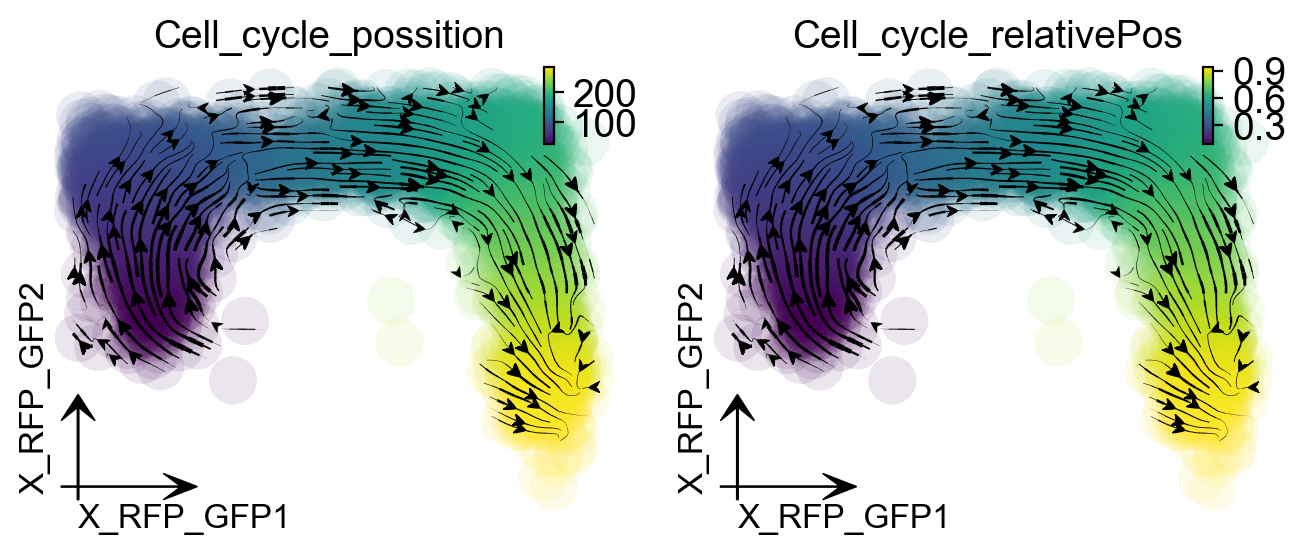
When we project our estimated transcriptomic RNA velocity to the space formed by the \(log_{10}(\) fluorescence\()\), Geminin-GFP and \(log_{10}(\) fluorescence\()\), Cdt1-RFP (Geminin and Cdt1 are two markers of different cell cycle stages), we can see a nice transition from early cell cycle stage to late cell cycle stage using dynamo.pl.streamline_plot().
def streamline(adata):
dyn.tl.reduceDimension(adata, reduction_method='umap')
dyn.tl.cell_velocities(adata, enforce=True, vkey='velocity_T', ekey='M_t', basis='RFP_GFP')
dyn.pl.streamline_plot(adata, color=['Cell_cycle_possition', 'Cell_cycle_relativePos'],
basis='RFP_GFP',figsize=(4,3))
return adata
rpe1_kinetics.obsm['X_RFP_GFP'] = rpe1_kinetics.obs.loc[:, ['RFP_log10_corrected',
'GFP_log10_corrected']].values.astype('float')
streamline(rpe1_kinetics)
|-----> retrieve data for non-linear dimension reduction...
|-----? adata already have basis umap. dimension reduction umap will be skipped!
set enforce=True to re-performing dimension reduction.
|-----> [UMAP] completed [0.0027s]
|-----> [calculating transition matrix via pearson kernel with sqrt transform.] in progress: 100.0000%|-----> [calculating transition matrix via pearson kernel with sqrt transform.] completed [3.8565s]
|-----> [projecting velocity vector to low dimensional embedding] in progress: 100.0000%|-----> [projecting velocity vector to low dimensional embedding] completed [0.9468s]
|-----> method arg is None, choosing methods automatically...
|-----------> method kd_tree selected
|-----> method arg is None, choosing methods automatically...
|-----------> method kd_tree selected
|-----------> plotting with basis key=X_RFP_GFP
|-----------> plotting with basis key=X_RFP_GFP
AnnData object with n_obs × n_vars = 2793 × 11522
obs: 'Plate_Id', 'Condition_Id', 'Well_Id', 'RFP_log10_corrected', 'GFP_log10_corrected', 'Cell_cycle_possition', 'Cell_cycle_relativePos', 'exp_type', 'time', 'nGenes', 'nCounts', 'pMito', 'pass_basic_filter', 'total_Size_Factor', 'initial_total_cell_size', 'new_Size_Factor', 'initial_new_cell_size', 'Size_Factor', 'initial_cell_size', 'ntr', 'cell_cycle_phase'
var: 'Gene_Id', 'nCells', 'nCounts', 'query', 'scopes', '_id', '_score', 'symbol', 'pass_basic_filter', 'log_m', 'score', 'log_cv', 'frac', 'use_for_pca', 'ntr', 'use_for_dynamics', 'use_for_transition'
uns: 'pp', 'velocyto_SVR', 'feature_selection', 'PCs', 'explained_variance_ratio_', 'pca_mean', 'cell_phase_order', 'cell_phase_genes', 'vel_params_names', 'dynamics', 'neighbors', 'umap_fit', 'grid_velocity_umap', 'grid_velocity_RFP_GFP'
obsm: 'X_pca', 'cell_cycle_scores', 'X_umap', 'velocity_umap', 'X_RFP_GFP', 'velocity_RFP_GFP'
varm: 'vel_params'
layers: 'new', 'total', 'X_total', 'X_new', 'M_t', 'M_tt', 'M_n', 'M_tn', 'M_nn', 'velocity_N', 'velocity_T', 'cell_wise_alpha'
obsp: 'moments_con', 'distances', 'connectivities', 'pearson_transition_matrix'
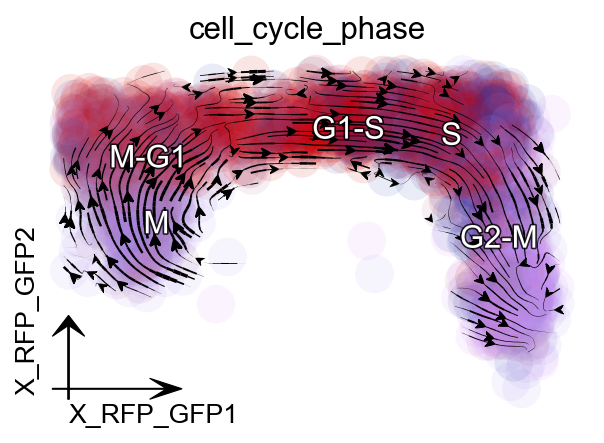
Since dynamo automatically performs the cell cycle staging at the preprocess step with cell-cycle related marker genes using methods from Norman et. al. We can also check whether dynamo’s staging makes any sense for this dataset. Interestingly, dynamo staging indeed reveals a nice transition from M stage to M-G, to G1-S, to S and finally to G2-M stage. This is awesome!
dyn.pl.streamline_plot(rpe1_kinetics, color=['cell_cycle_phase'],
basis='RFP_GFP',figsize=(4,3))
|-----> method arg is None, choosing methods automatically...
|-----------> method kd_tree selected
|-----------> plotting with basis key=X_RFP_GFP
|-----------> skip filtering cell_cycle_phase by stack threshold when stacking color because it is not a numeric type
Animate cell cycle transition
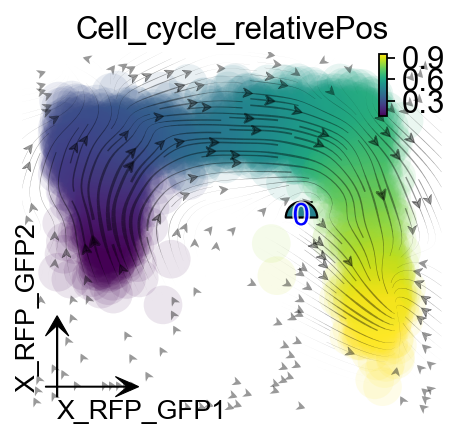
We use dynamo.vf.VectorField for vector field reconstruction and dynamo.pd.fate() for trajectory prediction to create an animation of cell cycle transition.
dyn.vf.VectorField(rpe1_kinetics, basis='RFP_GFP',
map_topography=True, M=50)
|-----> VectorField reconstruction begins...
|-----> Retrieve X and V based on basis: RFP_GFP.
Vector field will be learned in the RFP_GFP space.
|-----> Generating high dimensional grids and convert into a row matrix.
|-----> Learning vector field with method: sparsevfc.
|-----> [SparseVFC] begins...
|-----> Sampling control points based on data velocity magnitude...
|-----> method arg is None, choosing methods automatically...
|-----------> method kd_tree selected
|-----> [SparseVFC] completed [0.1052s]
|-----------> current cosine correlation between input velocities and learned velocities is less than 0.6. Make a 1-th vector field reconstruction trial.
|-----> [SparseVFC] begins...
|-----> Sampling control points based on data velocity magnitude...
|-----> [SparseVFC] completed [0.0527s]
|-----------> current cosine correlation between input velocities and learned velocities is less than 0.6. Make a 2-th vector field reconstruction trial.
|-----> [SparseVFC] begins...
|-----> Sampling control points based on data velocity magnitude...
|-----> [SparseVFC] completed [0.0489s]
|-----------> current cosine correlation between input velocities and learned velocities is less than 0.6. Make a 3-th vector field reconstruction trial.
|-----> [SparseVFC] begins...
|-----> Sampling control points based on data velocity magnitude...
|-----> [SparseVFC] completed [0.0793s]
|-----------> current cosine correlation between input velocities and learned velocities is less than 0.6. Make a 4-th vector field reconstruction trial.
|-----> [SparseVFC] begins...
|-----> Sampling control points based on data velocity magnitude...
|-----> [SparseVFC] completed [0.0567s]
|-----------> current cosine correlation between input velocities and learned velocities is less than 0.6. Make a 5-th vector field reconstruction trial.
|-----? Cosine correlation between input velocities and learned velocities is less than 0.6 after 5 trials of vector field reconstruction.
|-----> Mapping topography...
|-----> method arg is None, choosing methods automatically...
|-----------> method kd_tree selected
|-----> [VectorField] completed [1.3628s]
progenitor = rpe1_kinetics.obs_names[rpe1_kinetics.obs.Cell_cycle_relativePos < 0.1]
len(progenitor)
78
from matplotlib import animation
info_genes = rpe1_kinetics.var_names[rpe1_kinetics.var.use_for_transition]
dyn.pd.fate(rpe1_kinetics, basis='RFP_GFP', init_cells=progenitor,
interpolation_num=100, direction='forward',
inverse_transform=False, average=False)
AnnData object with n_obs × n_vars = 2793 × 11522
obs: 'Plate_Id', 'Condition_Id', 'Well_Id', 'RFP_log10_corrected', 'GFP_log10_corrected', 'Cell_cycle_possition', 'Cell_cycle_relativePos', 'exp_type', 'time', 'nGenes', 'nCounts', 'pMito', 'pass_basic_filter', 'total_Size_Factor', 'initial_total_cell_size', 'new_Size_Factor', 'initial_new_cell_size', 'Size_Factor', 'initial_cell_size', 'ntr', 'cell_cycle_phase', 'control_point_RFP_GFP', 'inlier_prob_RFP_GFP', 'obs_vf_angle_RFP_GFP'
var: 'Gene_Id', 'nCells', 'nCounts', 'query', 'scopes', '_id', '_score', 'symbol', 'pass_basic_filter', 'log_m', 'score', 'log_cv', 'frac', 'use_for_pca', 'ntr', 'use_for_dynamics', 'use_for_transition'
uns: 'pp', 'velocyto_SVR', 'feature_selection', 'PCs', 'explained_variance_ratio_', 'pca_mean', 'cell_phase_order', 'cell_phase_genes', 'vel_params_names', 'dynamics', 'neighbors', 'umap_fit', 'grid_velocity_umap', 'grid_velocity_RFP_GFP', 'cell_cycle_phase_colors', 'VecFld_RFP_GFP', 'fate_RFP_GFP'
obsm: 'X_pca', 'cell_cycle_scores', 'X_umap', 'velocity_umap', 'X_RFP_GFP', 'velocity_RFP_GFP', 'velocity_RFP_GFP_SparseVFC', 'X_RFP_GFP_SparseVFC'
varm: 'vel_params'
layers: 'new', 'total', 'X_total', 'X_new', 'M_t', 'M_tt', 'M_n', 'M_tn', 'M_nn', 'velocity_N', 'velocity_T', 'cell_wise_alpha'
obsp: 'moments_con', 'distances', 'connectivities', 'pearson_transition_matrix'
import matplotlib.pyplot as plt
fig, ax = plt.subplots(figsize=(4,3))
ax = dyn.pl.topography(rpe1_kinetics, basis='RFP_GFP',
color='Cell_cycle_relativePos', ax=ax,
save_show_or_return='return', fps_basis='RFP_GFP')
ax.set_aspect(0.8)
|-----------> plotting with basis key=X_RFP_GFP
%%capture
instance = dyn.mv.StreamFuncAnim(adata=rpe1_kinetics, basis='RFP_GFP',
color='Cell_cycle_relativePos', ax=ax, fig=fig)
|-----? the number of cell states with fate prediction is more than 50. You may want to lower the max number of cell states to draw via cell_states argument.
import matplotlib
matplotlib.rcParams['animation.embed_limit'] = 2**64 # Ensure all frames will be embedded.
from matplotlib import animation
import numpy as np
anim = animation.FuncAnimation(instance.fig, instance.update, init_func=instance.init_background,
frames=np.arange(100), interval=100, blit=True)
from IPython.core.display import display, HTML
HTML(anim.to_jshtml()) # embedding to jupyter notebook.